Feature List
Which Data Fields can asynchronous processing of Smartscan extract?
Below is an overview of all the features we support.
- The caller has to specify which fields they want processed by the API.
- We continuously work with our integrations to expand our feature and language support. Please contact us if you would like us to look into new features.
Feature items
Information
Note that we do not infer implicit columns, meaning we do not infer information that is not stated explicitly in the line items table. Similarly, we won't return prices including and excluding VAT, unless they are listed explicitly in the document.
Information
Which pages are read depends on the feature. The field level predictions - totals, dates, supplier and receiver details, payment IDs and the other single value features - together with VAT_DISTRIBUTION are read from the first and last page that holds text, so blank cover and back pages are skipped and never show up in a pageRef. PURCHASE_LINES, PAGE_TEXTS, QR_CODES, SWISS_QR_BILLS and question answering are processed across all pages, whatever the length of the document.
Information
When a requested feature finds nothing on the document, it is left out of the annotations array altogether rather than returned as an empty entry - for example, requesting QR_CODES for a document that contains no QR code produces no QR_CODES annotation at all. Always look a feature up by its feature name rather than assuming it is present.
| Feature name | Premium | Description | Example |
|---|---|---|---|
| BANK_ACCOUNT_NUMBER | * | Bank account number | 0002012345 |
| BANK_REGISTRATION_NUMBER | * | Bank registration number (in countries where relevant - eg. Denmark) | 0007 |
| BIC | * | BIC code | DABADKKK |
| CREDIT_CARD_LAST_FOUR | Last four digits of the credit card that was used for payment | 2345 |
|
| CURRENCY | Three-letter currency code | EUR |
|
| CUSTOMER_NUMBER | * | Number that identifies the customer | 12345 |
| DOCUMENT_DATE | * | The date that the document was issued | 2022-10-24 |
| DOCUMENT_NUMBER | * | A number that identifies the document (invoice number for invoices etc.) | 012782-04 |
| DOCUMENT_TYPE | Support for Invoice, Receipt, Credit Note and Debit Note |
Invoice |
|
| IBAN | IBAN code | DK50 0007 0007 1112 22 |
|
| KSEF | Polish KSeF invoice identifier. The extracted number is checksum validated, and is only returned when a valid KSeF number is found on the document. | 1111111111-20250801-A1B2C3D4E5F6-3C |
|
| OCR_LINE_BE_PAYMENT_ID | * | Belgian Payment ID: OGM | +++123/1234/12345+++ |
| OCR_LINE_DK_CREDITOR_ID | Danish creditor ID: FIK Account number | 12345678 |
|
| OCR_LINE_DK_PAYMENT_ID | Danish Payment ID: FIK Debitor or payment reference | 000000001010123 |
|
| OCR_LINE_DK_TYPE | Danish Payment info: FIK Type field | +71 |
|
| OCR_LINE_FI_PAYMENT_ID | Finnish Payment ID: Viitenumero | 123456789 |
|
| OCR_LINE_NL_PAYMENT_ID | Dutch Payment ID: Betalingskenmerk | 123456789 |
|
| OCR_LINE_NO_PAYMENT_ID | Norwegian Payment ID: Kundeidentifikasjon (KID) | 123456789 |
|
| OCR_LINE_SE_BANKGIRO_CREDITOR_ID | Swedish Payment info: BankGiro | 0070070 |
|
| OCR_LINE_SE_PAYMENT_ID | Swedish Payment ID :Märkning | 123456789 |
|
| OCR_LINE_SE_PLUSGIRO_CREDITOR_ID | Swedish Payment info: PlusGiro | 41 |
|
| ORDER_NUMBER | * | (experimental). Order number if present on e.g. an invoice | 20220201-1234 |
| PAGE_TEXTS | The text content of the document per page. | ||
| PAYMENT_DUE_DATE | The last day that the payment has to be made | 2022-10-24 |
|
| PAYMENT_METHOD | Cash, CreditCard or BankTransfer |
BankTransfer |
|
| PRODUCT_TYPES | Product type classification for purchase lines. See Product Types below. | RESTAURANTS |
|
| PURCHASE_LINES | * | Line items information; description, quantity and prices. See all the supported fields listed below. | |
| QR_CODES | Extract QR codes found in document images. Returns the decoded content of any QR codes detected. See QR Codes. | {"content": "https://example.com"} |
|
| RECEIVER_ADDRESS | * | (experimental). Also returns a structured address with parsed components. | |
| RECEIVER_COUNTRY_CODE | * | (experimental) | |
| RECEIVER_NAME | * | (experimental) | |
| RECEIVER_ORDER_NUMBER | * | (experimental) | |
| RECEIVER_VAT_NUMBER | * | (experimental) | |
| SUPPLIER_ADDRESS | * | Address of the supplier's company. Also returns a structured address with parsed components. | Gærtorvet 3, 1799 København |
| SUPPLIER_COUNTRY_CODE | Two-letter country code of the supplier's origin | DK |
|
| SUPPLIER_NAME | * | Name of the supplier's company | Visma |
| SUPPLIER_ORGANISATION_NUMBER | * | National company ID (e.g. CVR in DK or KvK in the NL) | 11122007 |
| SUPPLIER_VAT_NUMBER | * | VAT number for the supplier's company (relevant in the EU) | DK11122007 |
| SWISS_QR_BILLS | Extract and parse Swiss QR bill payment information from QR codes. Returns structured payment data including amounts, accounts, and parties. | See Swiss QR Bills | |
| TEXT_ANNOTATION | The full OCR output for the document | ||
| TOTAL_EXCL_VAT | The total of the document excluding VAT. Will always be returned as absolute value. | 20.21 |
|
| TOTAL_INCL_VAT | The total of the document including VAT. Will always be returned as absolute value. | 21.50 |
|
| TOTAL_VAT | The total VAT of the document. Will always be returned as absolute value. | 1.29 |
|
| VAT_DISTRIBUTION | * | VAT levels; percentages and amount they represent. See the details here. | |
| VERIFIED | * | Cross-checks amounts, VAT levels and purchase lines against each other, then flags or corrects the affected values. Automatically enables the features the cross-validation needs - see VERIFIED results. |
Upcoming features
Smartscan currently cannot predict the Order Reference, but you can provide it as ORDER_REFERENCE in the Update Transaction Results call, which we can then use in the future to train Smartscan.
Default Feature Set
Unlike the synchronous Smartscan, the asynchronous Smartscan does not have a default feature set. The caller must specify which features they want to extract from the document.
Purchase Lines
Leverage Smartscan’s functionality for extracting invoice line item extraction. With the asynchronous processing of Smartscan, you can extract line items from invoices and receipts from documents with any number of pages.
| Feature Name | Type | Description | Example Value |
|---|---|---|---|
| itemNumber | string | This is the row number, position, index, or ID for this line item (if it is stated on the document). | 1 |
| code | string | Product code, product number, or SKU associated with the line item. It is an ID that the supplier assigns to each specific product. | A25006 |
| description | string | The text description for the line item. It will typically be the name of a product or a text describing the delivered service. | Sport socks long 3-pack black 43-46 |
| quantity | string | The quantity for this line item. | 12 |
| unit | string | The unit of the line item, e.g. ‘pieces’, ‘kg’, or ‘lb’. | kg |
| unitPriceInclVat | string | The net or gross price of one unit of this item including vat. | 12.5 |
| unitPriceExclVat | string | The net or gross price of one unit of this item excluding vat. | 12.5 |
| unitPrice | string | The net or gross price of one unit of this item. The unit price is typically referred to as the “Price” or “unit price”, and it is not always stated if it is incl or excl the vat amount. | 12.5 |
| totalInclVat | string | The total amount including vat. | 150.00 |
| totalExclVat | string | The total amount excluding vat. | 120.00 |
| total | string | The total amount is typically present for every line item, and is usually found as the rightmost value on the line. This is the value we return as total. This general total amount of this line item often does not distinguish between including VAT (totalInclVat) or excluding VAT (totalExclVat). |
150.00 |
| totalVat | string | The total vat amount for the specific line item. | 30.0 |
| percentageVat | string | The tax/vat rate associated with the line item. | 25.0 |
| pageRef | number | Page number on which the line was found. Starts at 1. | 1 |
| totalDiscount | string | The total discount for this line item, when it is stated on the document. | 5.00 |
| percentageDiscount | string | The discount percentage for this line item, when it is stated on the document. | 10.0 |
Simple and detailed response forms
The PURCHASE_LINES annotation carries the line items in two parallel forms:
purchaseLineCandidatesdeprecated - the simple form. Every field listed above holds a single string, the most likely value.purchaseLinesDetails- the detailed form. Every field listed above instead holds an array of candidates, each with its ownvalue,confidenceandpageRef. This is the form that carriesproductTypeand theVERIFIEDconfidence level.
pageRef stays a single number on both forms. purchaseLineCandidates is deprecated for purchase lines: it stays in place for backwards compatibility, but new fields (such as productType) are added only to purchaseLinesDetails. Use purchaseLinesDetails for new integrations.
Example (truncated):
{
    "id": "<transaction-id>",
    "annotations": [
        {
            "feature": "PURCHASE_LINES",
            "purchaseLineCandidates": [
                {
                    "pageRef": 1,
                    "description": "Sport socks long 3-pack black 43-46",
                    "quantity": "12",
                    "total": "150.00"
                }
            ],
            "purchaseLinesDetails": [
                {
                    "pageRef": 1,
                    "description": [
                        { "value": "Sport socks long 3-pack black 43-46", "confidence": { "level": "VERY_HIGH" } }
                    ],
                    "quantity": [
                        { "value": "12", "confidence": { "level": "HIGH" } }
                    ],
                    "total": [
                        { "value": "150.00", "confidence": { "level": "VERY_HIGH" } }
                    ]
                }
            ]
        }
    ]
}
Product Types
The PRODUCT_TYPES feature adds product type classification to each purchase line. When requested, the purchaseLinesDetails response includes a productType array on each line item with up to 5 ranked candidates.
Information
Requesting PRODUCT_TYPES automatically enables PURCHASE_LINES - there is no need to request it separately. It classifies based on the description field of each line item.
| Field | Type | Description | Example |
|---|---|---|---|
| type | string | Machine-readable product type identifier | RESTAURANTS |
| label | string | Human-readable product type name | Restaurants |
| confidence | number | Confidence score between 0 and 1 | 0.9835 |
| confidenceLevel | string | Discretized confidence level | HIGH |
For the full list of supported product types and the standalone Product Types API, see the Product Types documentation.
Example Request:
{
    "document": {
        "source": {
            "httpUri": "https://example.com/invoice.pdf"
        }
    },
    "features": ["PRODUCT_TYPES"],
    "tier": "PREMIUM"
}
Example Response (truncated):
{
    "id": "<transaction-id>",
    "annotations": [
        {
            "feature": "PURCHASE_LINES",
            "purchaseLinesDetails": [
                {
                    "pageRef": 1,
                    "description": [
                        { "value": "Latte 12oz", "confidence": { "level": "VERY_HIGH" } }
                    ],
                    "quantity": [
                        { "value": "2", "confidence": { "level": "HIGH" } }
                    ],
                    "totalInclVat": [
                        { "value": "7.18", "confidence": { "level": "HIGH" } }
                    ],
                    "unitPriceInclVat": [
                        { "value": "3.59", "confidence": { "level": "HIGH" } }
                    ],
                    "productType": [
                        {
                            "type": "RESTAURANTS",
                            "label": "Restaurants",
                            "confidence": 0.9835,
                            "confidenceLevel": "HIGH"
                        },
                        {
                            "type": "FOOD_BEVERAGES",
                            "label": "Food and non-alcoholic beverages",
                            "confidence": 0.0111,
                            "confidenceLevel": "VERY_LOW"
                        }
                    ]
                }
            ]
        }
    ],
    "customId": "my-first-transaction"
}
Multiple VAT levels
Leverage Smartscan's functionality for extracting multiple VAT levels present on a document. This feature is executed only on the first and last page of the document that hold text; blank pages are skipped. A document that holds no text at all produces no VAT output.
To begin using and access the feature, simply include VAT_DISTRIBUTION as a requested feature from Smartscan, as shown in Smartscan's feature list. This will add VAT outputs wherever our system identifies them. Please note that if Smartscan determines the relevant VAT information is not present on the document, no VAT output will be generated.
This also means that we do not attempt to compute VAT, base amount or amount including VAT based on the other features. We simply return what is stated on the document.
Information
The feature is now supported in almost all our markets. We have limited output to at most two distinct percentages based on the output quality.
Romania (RO), Norway (NO), Sweden (SE), Germany (DE), Finland (FI), Spain (ES).
| Feature Name | Type | Description | Example Value |
|---|---|---|---|
| percentage | string | VAT level percentage. The decimal delimiter is always a dot. | "percentage": "25.0" |
| amount | string | The amount the percentage represents rounded to two decimal points. | "amount": "585.45" |
| inclVat | string | Amount incl vat for this vat percentage. | "inclVat": "2926.25" |
| exclVat | string | The base amount vat is based on. | "exclVat": "2341.80" |
| pageRef | number | Page number on which the distribution was found. | "pageRef": 1 |
| Example | |
|---|---|
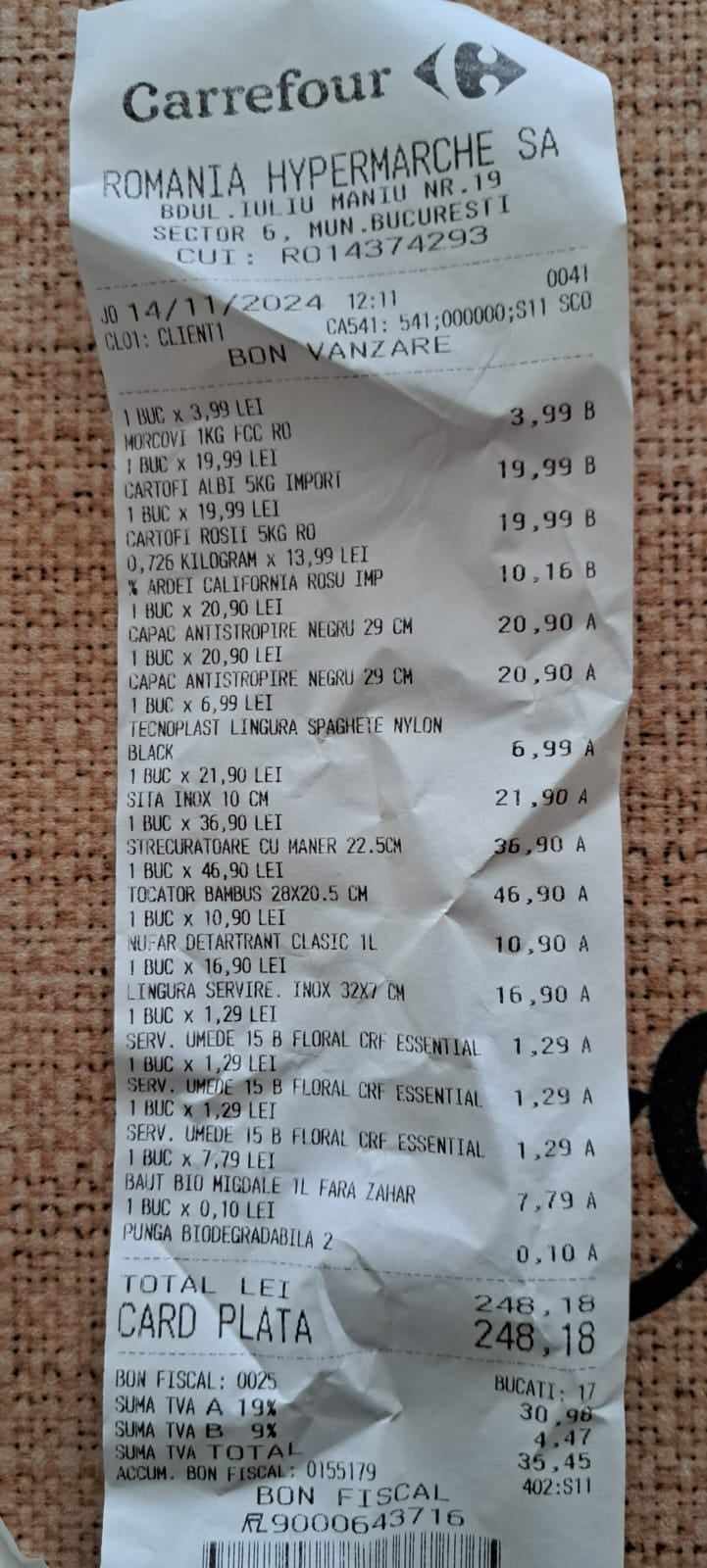 |
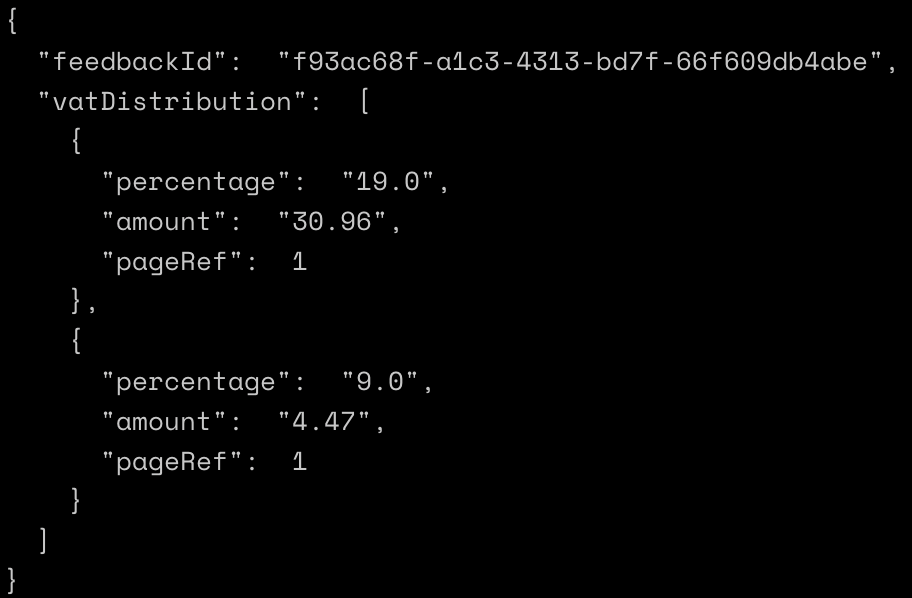 |
(In this example there is no explicit inclVat or exclVat amount - to these elements are not returned.)
VAT distribution response forms
As with purchase lines, the VAT_DISTRIBUTION annotation carries the results in two parallel forms:
vatDistributionCandidatesdeprecated - the simple form documented above, where every field holds a single string.vatDistributionDetails- the detailed form, where every field holds an array of candidates. The detailed form names the amountstotalVat,totalInclVatandtotalExclVatin place ofamount,inclVatandexclVat.
vatDistributionCandidates is deprecated: it stays in place for backwards compatibility, but new fields are added only to vatDistributionDetails. Use vatDistributionDetails for new integrations.
Structured Addresses
When you request SUPPLIER_ADDRESS or RECEIVER_ADDRESS, Smartscan automatically returns a structured version of the address in addition to the raw text. The raw address is parsed and validated using a geocoding service, breaking it down into individual components such as street, postal code, city, and country.
The structured address is returned in the structuredAddress field on the annotation. Entries follow the order in which the addresses were predicted, so the first entry belongs to the first predicted address.
Information
structuredAddress can contain more entries than candidates. The structured addresses are resolved before the confidence filtering is applied, so with the default max_results of 1 you may receive a single candidate alongside several structured addresses.
Information
The structured address is only populated when the geocoding service can successfully parse and validate the raw address. If the address cannot be resolved, an empty structured address object is returned for that candidate.
| Field Name | Type | Description | Example Value |
|---|---|---|---|
| street | string | Street name | "Gærtorvet" |
| postalCode | string | Postal or ZIP code | "1799" |
| city | string | City or town name | "København" |
| country | string | Full country name, in the local language of the address | "Danmark" |
| countryCode | string | Two-letter country code (ISO 3166-1 alpha-2) | "DK" |
Example Response (truncated):
{
    "id": "<transaction-id>",
    "annotations": [
        {
            "feature": "SUPPLIER_ADDRESS",
            "candidates": [
                {
                    "value": "Gærtorvet 3, 1799 København",
                    "confidence": { "level": "HIGH" }
                }
            ],
            "structuredAddress": [
                {
                    "street": "Gærtorvet",
                    "postalCode": "1799",
                    "city": "København",
                    "country": "Danmark",
                    "countryCode": "DK"
                }
            ]
        },
        {
            "feature": "RECEIVER_ADDRESS",
            "candidates": [
                {
                    "value": "Bernstorffsgade 1570 København",
                    "confidence": { "level": "HIGH" }
                }
            ],
            "structuredAddress": [
                {
                    "street": "Bernstorffsgade",
                    "postalCode": "1570",
                    "city": "København",
                    "country": "Danmark",
                    "countryCode": "DK"
                }
            ]
        }
    ]
}
Question Answering (QA)
Questions for Smartscan is a powerful API feature designed to revolutionise the way businesses interact with their documents. It is a general-purpose question-answering system tailored specifically for business documents, serving as a supplementary tool to the standard feature extraction capabilities.
Information
With asynchronous processing, the QA feature can process documents of any length, making it ideal for comprehensive document analysis. Unlike the synchronous version which is limited to 5 questions on 5 pages, the async QA feature can handle larger documents and more complex question sets.
Questions
Our focus is on returning readable information directly from documents. While Questions for Smartscan is not a chatbot, users can ask human language questions about the content present in the document, like "what is the order number" or "what is the VAT amount". You cannot ask questions like "What is not on the document" or "What is the weather?"
How to Use QA
To use the QA functionality in asynchronous processing, simply provide one or more questions in the questions field of your request. The QA feature will be automatically added to your feature list when questions are present:
{
  "document": {
    "source": {
      "httpUri": "https://example.com/document.pdf"
    }
  },
  "features": ["TOTAL_INCL_VAT", "PURCHASE_LINES"],
  "questions": [
    "How much is the VAT amount?",
    "What is the order reference?",
    "What services were provided?",
    "What are the payment terms?"
  ]
}
Note
When you include questions in your request, the QA feature is automatically added to your feature list, so you don't need to explicitly specify it.
QA Response Format
The QA feature returns results within the standard async response structure. Each QA annotation contains a list of Answer Candidates:
| Field Name | Type | Description | Example Value |
|---|---|---|---|
| question | string | The original question that was asked | "How much is the VAT amount?" |
| answer | string | The extracted answer from the document. See the note below on questions the document does not answer. | "1.250,00" |
| pageRef | number | Page number where the answer was found | 1 |
Example QA Response
{
  "id": "transaction-id-123",
  "customId": "custom-id-456",
  "annotations": [
    {
      "feature": "QA",
      "answerCandidates": [
        {
          "question": "How much is the VAT amount?",
          "answer": "1.250,00",
          "pageRef": 1
        },
        {
          "question": "What is the order reference?",
          "answer": "No answer.",
          "pageRef": 1
        },
        {
          "question": "What services were provided?",
          "answer": "Consulting services for system integration and software development",
          "pageRef": 2
        }
      ]
    }
  ]
}
Information
When the information is not present in the document, the answer field does not necessarily come back as an empty string - it may instead contain sentinel text such as No answer., as shown in the second example above. Do not test for an empty string alone when deciding whether a question was answered.
The QA feature does not report a confidence for answers. The confidence field is omitted entirely from each answer candidate, so do not expect a confidence value or level for QA results.
QR Code Features
QR Codes
The QR_CODES feature extracts and decodes any QR codes found in document images. With asynchronous processing, this feature can scan all pages of any document length to identify QR codes and returns their decoded text content.
Information
Unlike the synchronous version which is limited to the first 5 pages, the async QR_CODES feature can process documents of any length, making it ideal for comprehensive QR code extraction from large documents.
Common use cases include: - Extracting URLs for digital receipts or additional information - Reading contact information or business details - Capturing payment references or transaction IDs - Processing multi-page documents with QR codes throughout
The decoded QR codes are returned in the qrCodes field of the QR_CODES annotation. Each entry is an object with a single content field holding the decoded text of one QR code:
{
    "id": "<transaction-id>",
    "annotations": [
        {
            "feature": "QR_CODES",
            "qrCodes": [
                { "content": "https://example.com" },
                { "content": "Supplier: Max Muster & Co" }
            ]
        }
    ]
}
Swiss QR Bills
The SWISS_QR_BILLS feature is specifically designed to extract and parse Swiss QR bill payment information. Swiss QR bills are standardized payment slips used in Switzerland that contain structured payment data encoded in QR codes.
Information
This feature automatically validates the QR bill format according to Swiss payment standards and only returns data from valid Swiss QR bills. Invalid or malformed QR bills are ignored. With async processing, it can handle documents of any length containing multiple Swiss QR bills.
When a valid Swiss QR bill is detected, the following structured information is extracted:
| Field Name | Type | Description | Example Value |
|---|---|---|---|
| qrType | string | Swiss QR Code identifier, always "SPC" | "SPC" |
| version | string | Swiss QR bill specification version | "0200" |
| codingType | string | Character encoding type, always "1" | "1" |
| account | string | IBAN or QR-IBAN of the creditor | "CH4431999123000889012" |
| creditorAddressType | string | Address format: "S" for structured, "K" for combined | "S" |
| creditorName | string | Name of the creditor or company | "Max Muster & Co" |
| creditorAddressLine1 | string | Street/P.O. Box or first address line of the creditor | "Musterstrasse" |
| creditorAddressLine2 | string | Building number or second address line of the creditor | "123" |
| creditorAddressPostalCode | string | Postal code of the creditor | "8000" |
| creditorAddressCity | string | City or town of the creditor | "Seldwyla" |
| creditorAddressCountry | string | Country code of the creditor | "CH" |
| ultimateCreditorAddressType | string | Address format of the ultimate creditor | "S" |
| ultimateCreditorName | string | Name of the ultimate creditor | "Sara Ultimate Creditor" |
| ultimateCreditorAddressLine1 | string | Street/P.O. Box or first address line of the ultimate creditor | "Ultimate Street" |
| ultimateCreditorAddressLine2 | string | Building number or second address line of the ultimate creditor | "456" |
| ultimateCreditorAddressPostalCode | string | Postal code of the ultimate creditor | "9000" |
| ultimateCreditorAddressCity | string | City or town of the ultimate creditor | "Ultimate City" |
| ultimateCreditorAddressCountry | string | Country code of the ultimate creditor | "CH" |
| amount | string | Payment amount | "1949.75" |
| currency | string | Payment currency (CHF or EUR) | "CHF" |
| ultimateDebtorAddressType | string | Address format of the ultimate debtor | "S" |
| ultimateDebtorName | string | Name of the ultimate debtor | "Sara Beispiel" |
| ultimateDebtorAddressLine1 | string | Street/P.O. Box or first address line of the ultimate debtor | "Musterstrasse" |
| ultimateDebtorAddressLine2 | string | Building number or second address line of the ultimate debtor | "1" |
| ultimateDebtorAddressPostalCode | string | Postal code of the ultimate debtor | "8000" |
| ultimateDebtorAddressCity | string | City or town of the ultimate debtor | "Seldwyla" |
| ultimateDebtorAddressCountry | string | Country code of the ultimate debtor | "CH" |
| paymentReferenceType | string | Reference type: "QRR", "SCOR", or "NON" | "QRR" |
| paymentReference | string | Payment reference number | "210000000003139471430009017" |
| unstructuredMessage | string | Additional payment information or message | "Order from 15.10.2020" |
| trailer | string | End of payment data indicator, always "EPD" | "EPD" |
| billingInformation | string | Structured billing information for automated booking | "//S1/10/1234/11/201021" |
| av1Parameters | string | Parameters of the first alternative payment scheme | "eBill/B/john@example.com" |
| av2Parameters | string | Parameters of the second alternative payment scheme | "eBill/B/jane@example.com" |
Example Response:
{
  "id": "<transaction-id>",
  "annotations": [
    {
      "feature": "SWISS_QR_BILLS",
      "swissQrBills": [
        {
        "qrType": "SPC",
        "version": "0200",
        "codingType": "1",
        "account": "CH4431999123000889012",
        "creditorAddressType": "S",
        "creditorName": "Max Muster & Co",
        "creditorAddressLine1": "Musterstrasse",
        "creditorAddressLine2": "123",
        "creditorAddressPostalCode": "8000",
        "creditorAddressCity": "Seldwyla",
        "creditorAddressCountry": "CH",
        "ultimateCreditorAddressType": "S",
        "ultimateCreditorName": "Sara Ultimate Creditor",
        "ultimateCreditorAddressLine1": "Ultimate Street",
        "ultimateCreditorAddressLine2": "456",
        "ultimateCreditorAddressPostalCode": "9000",
        "ultimateCreditorAddressCity": "Ultimate City",
        "ultimateCreditorAddressCountry": "CH",
        "amount": "1949.75",
        "currency": "CHF",
        "ultimateDebtorAddressType": "S",
        "ultimateDebtorName": "Sara Beispiel",
        "ultimateDebtorAddressLine1": "Musterstrasse",
        "ultimateDebtorAddressLine2": "1",
        "ultimateDebtorAddressPostalCode": "8000",
        "ultimateDebtorAddressCity": "Seldwyla",
        "ultimateDebtorAddressCountry": "CH",
        "paymentReferenceType": "QRR",
        "paymentReference": "210000000003139471430009017",
        "unstructuredMessage": "Order from 15.10.2020",
        "trailer": "EPD"
        }
      ]
    }
  ]
}