Questions for Smartscan
Questions for Smartscan is a powerful API feature of Smartscan, designed to revolutionise the way businesses interact with their documents. It is a general-purpose question-answering system tailored specifically for business documents.
Smartscan is great at extracting structured data like dates and totals. Questions is our supplementary API feature designed to go deeper. It allows you to query your documents using natural language to extract specific information that isn't part of our standard field set.
This feature is built to be a precise information extractor. It only answers based on what is actually present in the document. You can ask "What is the order number?" but it won't answer "What is the weather?" or provide information not found on the page.
Why use this feature?
- Targeted extraction: Get specific data points like project codes, expiry dates, specific line-item details, and so on.
- Human-language prompting: No complex logic needed.
- Seamless integration: It’s part of our existing AnnotateDocument endpoint, so you can request questions alongside your standard scan.
Try this feature with our demo
You can explore this feature in our portal (both Staging and Production), which includes a dedicated demo environment, or on our website.
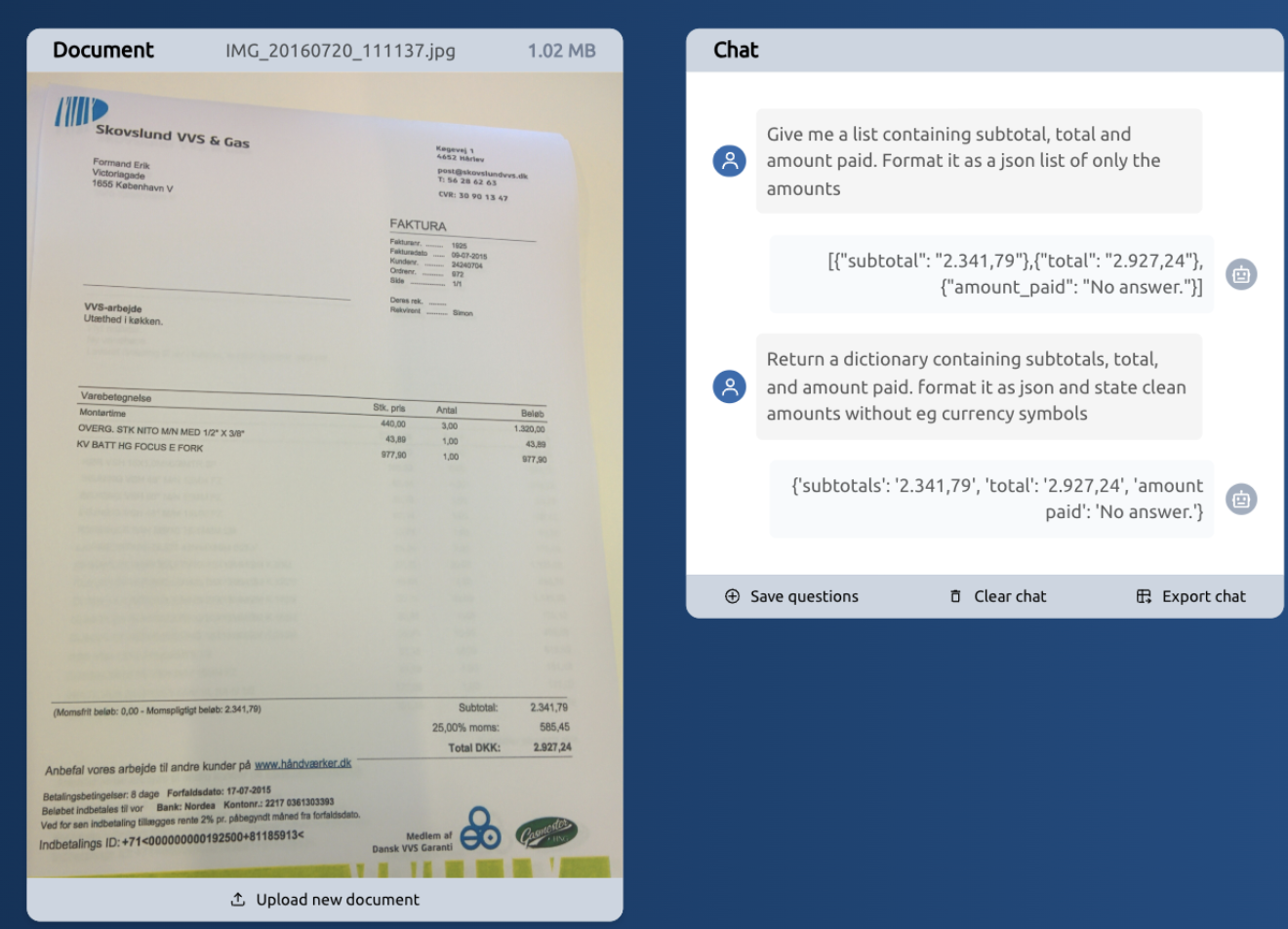
The demo application, or Document Chat prototype, showcases what this feature can do. You can upload documents and query your content, receiving answers about what is on the document based on what you ask for.
Get started with the API
The API is available both in our Staging environment and Production environment, and is free to use up to 5 questions and max 5 pages-long documents.
We have expanded our endpoint AnnotateDocument. In the API endpoint /v1/document:annotate, you can now define a list of questions to be processed, along with other requested features. This is shown in the example request below.
Tips for better results: Since Questions rely on smart prompting, being specific helps. Instead of asking for "the list," try asking for "the list of items including their prices." If you need structured data in your answers one option is to ask for json formatting as shown in the example below.
Example request
POST v1/document:annotate
https://api.stag.ssn.visma.ai/v1/document:annotate
Authorization - Bearer Token
Token: demo
Body - raw (json)
Body
{
    "document": {
        "source": {
            "httpUri": "http://classy.dk/ftest0716/IMG_20160720_111051.jpg"
        }
    },
    "features": [
        {"type": "TOTAL_VAT"},
        {"type":"RECEIVER_NAME"},
        {"type": "PURCHASE_LINES"},
        {"type": "PAGE_TEXTS"}

    ],
    "questions": [
        "How much is the VAT amount",
        "What is the order reference?"
    ],
    "tier": "PREMIUM"
}
Upon querying the endpoint, the response will comprise a list of Answer Candidates, that will have up to 25 entries (five questions for a maximum of five pages).
A single Answer Candidate contains:
- The question that was asked and its corresponding answer. Note that the answer might not be there, if the document chat determines that the information is not present on the document. This is shown in the example below.
- Page Reference
- Confidence Level
Example response
Body - raw (json)
Body
{
    "feedbackId": "df7d8a8e-3332-40c1-bb97-aa981bcd0c4f",
    "answers": [
        {
            "question": "how much is the VAT amount",
            "answer": "1.250,00",
            "confidence": {
                "value": 0.734356344
            },
            "pageRef": 1
        },
        {
            "question": "What is the order reference?",
            "confidence": {
                "value": 0.999989629
            },
            "pageRef": 1
        }
    ]
}
The combination of a question + page reference serves to backtrack what information was extracted and which page it was from.
You can then compare the confidences across the pages and find the most probable answer for the entire document. Alternatively, show the value for each individual page.
See the full API specification in vmlapis.
Feedback example
Example request
To provide feedback for a questions you have asked, include the following structure in the feedback request body:
POST /v1/feedback:create
https://api.stag.ssn.visma.ai/v1/feedback:create
Authorization - Bearer Token
Token: demo
Body - raw (json)
Body
{
    "id": "65226d1b-1c70-425c-9288-a29106928ef2",
    "tags": [
        "foo",
        "bar",
        "baz",
        "qux"
    ],
    "true_values": {
        "answers": [
            {
                "question": "How much is VAT?",
                "answer": "12.0%",
                "pageRef": 1
            },
            {
                "question": "What is the order reference?",
                "answer": "123456",
                "pageRef": 1
            }
    ]
    }

}